Co|See vs. email for selections and approvals.
Email is the paper trail. It's a hard place to find the current version of a selection, or the photo that went with it.
Email: Gmail, Outlook and long reply-all threads
Where email stops keeping up
The current version is a guess.
Selections change after the email goes out. The PDF in the thread is the version from that day.
Threads split.
Someone replies instead of replying all, and half the project misses the change.
Attachments are slow on site.
Opening a 30-page PDF on a phone to find one faucet takes a while, especially with one bar of signal.
Side by side.
| Compared | Co|See | |
|---|---|---|
| Finding a selection later | Search your inbox for the right subject line | Search the project, or open the room |
| The product | An attachment or a link in a long thread | A photo of the actual product, plus the link |
| Finish, size and install notes | In the body of an email, or a PDF attached to it | On the item, next to the photo |
| What's final | Whichever reply came last | Marked on each selection |
| Who sees what | Whoever was copied on that thread | Each person gets the access you choose |
| On the job site | Hunting for the attachment on your phone | Your phone, with or without signal |
| Questions from the trades | A new thread for each one | Comments on the item they're about |
| After you move in | In an archive folder, if you made one | The record of your house |
In Co|See
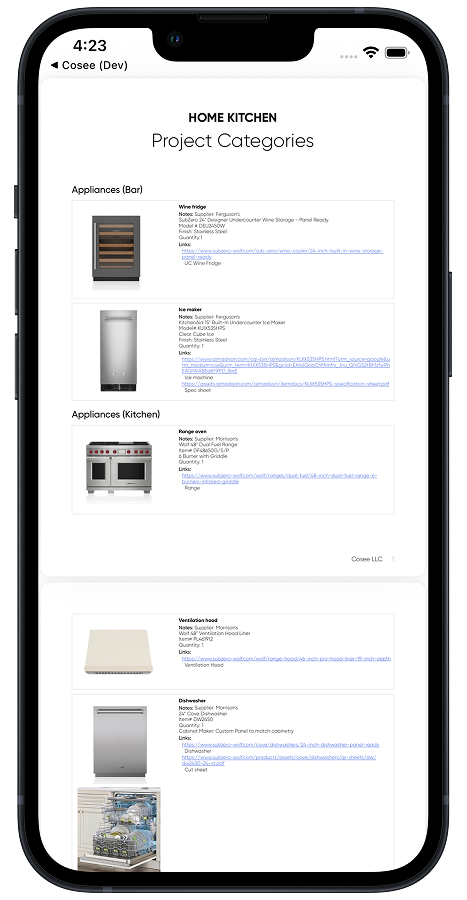
The spec sheet comes from today's selections.
Generate a spec sheet whenever someone wants one, from the selections as they are now: products, photos and dimensions by category.
When email is the right tool
- Contracts, change orders and formal approvals that need a paper trail.
- Sending documents to people outside the project.
- Longer explanations that need more than a comment.
Keep the paper trail in email. Keep the selections, and the photos that go with them, in Co|See.
Moving selections out of the inbox
Import the selection PDF or spreadsheet from the email directly, and save product links to the selection they belong to. Everyone sees the current version from then on.
Start your project freeQuestions people ask.
How do I keep track of selections my designer emails me?
Import the PDF or spreadsheet they send directly into Co|See. Each selection comes in ready for photos, notes and progress, and everyone sees the current version when it changes.
Should approvals still go through email?
Contracts, change orders and formal approvals belong wherever your contract says. Co|See marks which selections are final and keeps the photo and details with them.
How do I share selections with my contractor without emailing PDFs?
Invite them to the project, or send a spec sheet generated from the current selections.
Put the selections where everyone can find them.
Start with the ones you already have. Import a spreadsheet or PDF, or take a photo of the next thing you choose.